
Mac Driver
You can check this video to know: Installing Label Printer Driver and Preparing before use AM-243-BT on MAC: "https://www.youtube.com/watch?v=lbPB4s7fGGY"
AM-243-BT requires OS X 10.11 or newer.
1.Please find the USB flash in the package, the driver is inside,
Or download the Mac driver from here: Download
(1) Before installation, please ensure the printer is connected and turned on!
(2) Double click the "pkg" installer to begin.
*Tips: If there is an error the .pkg file can’t be opened because it is from an unidentified developer when installing the driver, please follow the steps below to allow the macOS to finish the installation
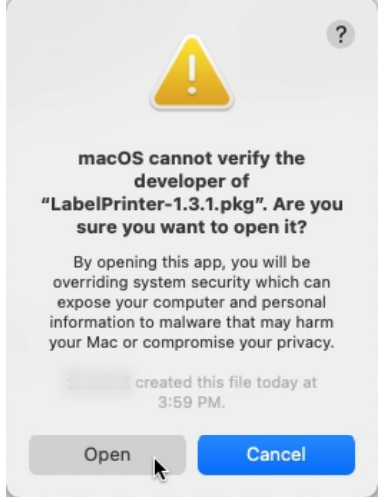
(1) Go to the Security & privacy

(2) Select to allow the file in the option pointed in this pic.

2. When you open the download file, you should see the screen shown below. It is highly recommended that you open the installation guide so you can follow along.
Please double-click on the pkg installer to begin. Follow the installation steps until you receive the "Installation was successful" message shown below.

After the installation is complete, if you cannot find the printer in your Mac, please follow the steps below.
(1) Click " " and go to "System Preferences" -> select "Printer & Scanners"

(2) Click "+" to add a printer

(3) Select "Label Printer"-> Click "Select Software " under "Use"
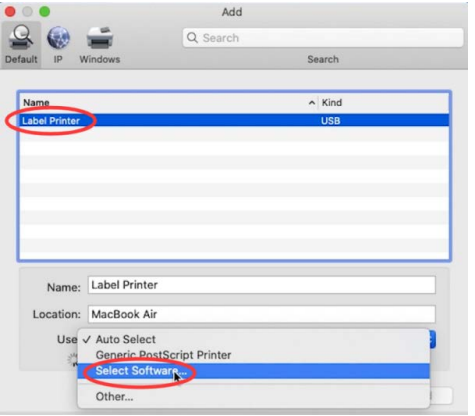
->Select "Label Printer" and click "OK"
->Click "Add"